How to Automate Shopee Malaysia Order Processing: A Step-by-Step Guide
Erra21 Apr 2026 07:33ENCopy link & title

What challenges do Malaysian sellers face with Shopee order processing?
Malaysia's e-commerce market is massive (RM1.184 trillion transaction revenue in 2023, and Shopee sellers can see huge order spikes during campaigns (11.11, 12.12, etc). Manually refreshing orders, copying customer details, and printing labels printing is time-consuming. Without automation, sellers risk inventory mismatches (manual tracking can cause up to 15% oversell errors and slower shipping. For example, sellers may take processing orders manually) 3–5 minutes per order, which multiplies into hours of work. These manual workflows become unsustainable as Malaysian sellers scale up or manage multiple Shopee stores and platforms.
How does BigSeller compare to other Shopee automation tools in Malaysia?
|
Aspect |
BigSeller |
Zetpy |
EasyStore |
|
Platform support |
Shopee Malaysia, Lazada, TikTok Shop, and 16+ platforms across SEA |
Shopee Malaysia, Lazada, Malaysia's Prestomall & Lelong |
Online store + Shopee, Lazada, TikTok, Zalora, PGMall |
|
Target market |
Small to large multichannel sellers in SEA |
Small-to-mid Malaysian sellers (up to thousands of orders/month) |
Retailers needing integrated webstore + marketplaces |
|
Key features |
Real-time order sync, bulk order processing, centralised inventory & tracking sync |
Order/inventory syncing, basic analytics, Shopify/Woo plugins |
Unified store builder, POS, inventory sync, marketplace listing (Shopee, etc) |
|
Best for |
Multi-platform sellers needing deep automation and WMS batch support |
Shopee/Lazada sellers wanting simple channel sync |
Brand-focused retailers with both online store and marketplace sales |
|
Price range |
Free plan available; paid tiers (approx. MYR129–1,299/mo) |
Free (≤100 orders/mo) to ~RM7,188/yr for high-volume tiers |
Standard: S$61/mo (~RM190) to Growth: S$256/mo (~RM800) |
|
Language support |
English, Chinese, Bahasa Indonesia, Thai, Vietnamese (multilingual) |
English only (web dashboard in English) |
English, Malay, Chinese |
Key Insights:
-
BigSeller supports multi-channel automation and batch workflows (Shopee, Lazada, TikTok, etc), while Zetpy covers Malaysia's top 4 marketplaces (Shopee, Lazada, Prestomall, Lelong) and EasyStore focuses on unified eCommerce (store+POS) with marketplace connectors.
-
BigSeller's features (real-time sync, allocation rules, WMS batching) are designed for high-volume sellers, whereas Zetpy provides core order/inventory sync and EasyStore combines online store building with Shopee/Lazada integration.
-
BigSeller has a freemium model plus paid tiers (approximately MYR129–MYR1299/mo), Zetpy ranges from free to ~RM7,188/yr depending on orders, and EasyStore starts at SG$61/mo (~RM190).
How do Malaysian sellers choose the right Shopee automation tool?
- If you are a solo Shopee seller with low-to-moderate volume: You might start with basic tools. Zetpy's free tier (up to 100 orders/mo) can cover simple Shopee-Lazada syncing and inventory updates. EasyStore can serve if you also want an online store and POS integration.
- If you sell on Shopee and other platforms (Lazada, TikTok Shop) in Malaysia: BigSeller is recommended. BigSeller supports multi-store and multi-platform centralization, syncing inventory across Shopee, Lazada, and TikTok Shop together.
- If you handle high order volumes (hundreds per day) or multiple Shopee stores: BigSeller is recommended for batch processing. Its WMS features let you print hundreds of waybills at once and ship more orders with less labor.
- If you run an omnichannel retail business (online store + marketplaces): EasyStore may be suitable, as it unifies your webstore, POS, and Shopee/Lazada orders. BigSeller can still integrate marketplaces, but EasyStore's built-in store builder and loyalty features target this scenario.
How can Malaysian sellers automate Shopee order processing step by step with BigSeller?
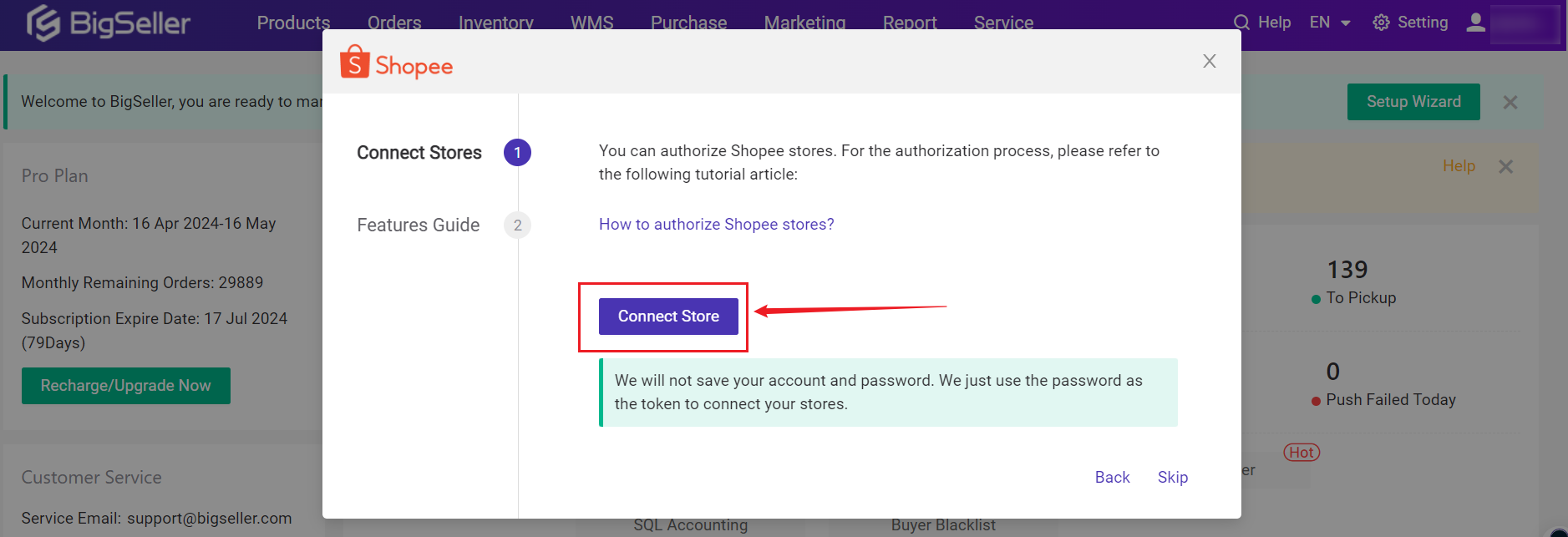
Use BigSeller's Setup Wizard or Settings > “Connect Store” and select Shopee. Log in via Shopee's official API to authorise BigSeller. Assign a store name in BigSeller so it can pull your products and past orders automatically.
-
Enable real-time order sync
After connecting, BigSeller will import new Shopee orders into the “Orders” dashboard in real time. You can click “Sync Orders” anytime to refresh manually. All new orders appear under New Orders.
-
Configure automation rules
In BigSeller, set up any allocation rules or warehouse auto-assignment. (By default one warehouse is created.) For example, use BigSeller's Allocation Rule to auto-assign incoming orders to the correct warehouse or shipping provider. BigSeller can also auto-generate invoices and apply bulk actions via its “Order Rules” settings.
-
Batch process orders
On the Orders page, select multiple Shopee orders and click “Deliver” or “Ship”. BigSeller can then batch-print shipping labels, airway bills, and pick lists. This WMS batch feature lets your packing team work faster.
-
Ship and sync tracking
After printing labels and handing orders to carriers, mark orders as shipped in BigSeller. The system will upload tracking numbers back to Shopee via API, fulfilling the orders on Shopee's side automatically. Stock levels are deducted in real time across all connected stores.
-
Monitor and repeat
Use BigSeller's analytics to monitor sales and inventory. For each campaign, you can repeat this process: new orders auto-import, pick/pack in bulk, and BigSeller updates Shopee with tracking. For large sales events, BigSeller's automation ensures orders are processed continuously without manual re-entry.
Frequently Asked Questions
Q1: Is it safe and allowed to use BigSeller with Shopee Malaysia?
A: Yes. Shopee's official API permits third-party tools. BigSeller is a certified Shopee partner, so using it complies with Shopee's rules. Your store data is securely accessed via Shopee's approved integration.
Q2: What Shopee order tasks does BigSeller automate?
A: BigSeller automates key fulfillment steps. It pulls in new Shopee orders automatically, generates invoices, prints shipping labels in bulk, and syncs tracking numbers back to Shopee. Essentially, everything from order import to final shipment can be automated.
Q3: Do I need technical skills to set up BigSeller?
A: No. BigSeller provides a user-friendly dashboard and guided setup. Connect Shopee through a setup wizard (as above), and most features are point-and-click. Malaysian sellers report that minimal training is needed, as BigSeller handles the technical integration.
Q4: Can BigSeller manage multiple Shopee stores or other platforms?
A: Yes. BigSeller can aggregate multiple Shopee stores (you can connect many accounts) and also supports Lazada, TikTok Shop, and more. All orders from different stores sync into one interface, making it easy to manage inventory and orders centrally.
Q5: How much time and error reduction can I expect?
A: Automation yields big efficiency gains. Sellers using BigSeller report up to a 60% reduction in manual workload during fulfillment. Eliminating manual entry also cuts mistakes: fewer wrong addresses or duplicated shipments. In practice, automation lets staff focus on packing and shipping instead of data entry.